Product: FileZilla Pro Enterprise Server
Status: Not yet available.
FileZilla Pro Enterprise Server’s Web Client can package a selection of files and folders into a single ZIP archive. The server builds the archive while it sends it to the browser, so users do not have to wait for the whole archive to be prepared first. A new Bulk downloads page in the server settings controls how many ZIP downloads can run at once and how much memory and temporary storage they can use.
Where to find the settings
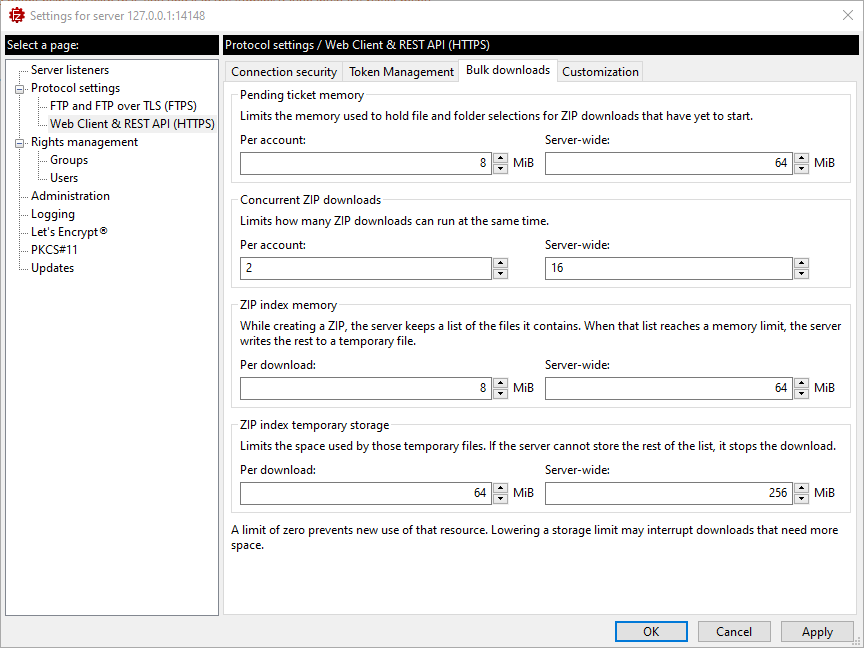
In the Administration interface, open Protocol settings, then Web Client & REST API (HTTPS), then the Bulk downloads tab.
Before a download starts
When a user selects files and folders for a ZIP, the server holds that selection in memory until the transfer begins. Two limits control this stage:
- Pending ticket memory caps the memory used for selections that have been requested but have not started yet. The per-account limit covers all pending selections for one account. The server-wide limit covers pending selections across all accounts.
- Concurrent ZIP downloads caps how many ZIP transfers can run at the same time. You can set a limit per account and across the whole server. If either limit is reached, a new download waits until a slot is free.
While a download is running
As the server streams the archive, it keeps an index of every file and folder inside it. The complete index is written at the end of the ZIP file. Two limits control where that index is kept:
- ZIP index memory sets how much of the index stays in RAM. When the next entry would go over the per-download or server-wide limit, the server writes that entry and the rest of the index to a temporary file.
- ZIP index temporary storage sets how much disk space those temporary files can use, per download and server-wide. If the server runs out of space for the index, it interrupts that download.
Choosing limits
The space an index needs depends on two things: the number of entries and the length of their paths. A ZIP with a few large videos may need far less index space than a smaller ZIP with thousands of documents. If your users often download large folders of small files, raise the ZIP index limits before you raise the number of concurrent downloads.
| Setting | Scope | Controls |
|---|---|---|
| Pending ticket memory | Per account / server-wide | Memory for selections waiting to start |
| Concurrent ZIP downloads | Per account / server-wide | Number of ZIP transfers running at once |
| ZIP index memory | Per download / server-wide | RAM used for the archive index during a download |
| ZIP index temporary storage | Per download / server-wide | Disk space for index overflow files |
Things to know
- Setting a limit to zero stops new use of that resource.
- Lowering a storage limit while downloads are running can interrupt transfers that still need that space to finish. Plan changes for quiet periods.
Summary
Bulk downloads let Web Client users get a folder selection as one ZIP file. The four Bulk downloads limits keep the server responsive by controlling how many archives run at once, how much memory they use, and how much temporary disk space they can take. The feature is not yet available.